

Features
Everything Cibotti does.
One place for your team's records, projects and sign-offs.
The problem
Most disputes come down to three questions.
Who was assigned?
Every assignment is on the record, with a time.
What changed, and why?
Every change needs a reason, and the original stays visible.
Who signed off, and when?
Sign-offs are named, timed and sealed.
The Ledger
Every record sealed the moment it's saved.
- Who, where, when and on what device, kept with every entry.
- Tap Speak and talk instead of typing.
More about the Ledger
Log an inspection, a delivery, an incident or a repair from any phone. Each entry is fingerprinted and linked to the one before it, so a quiet edit shows.
- Photos and files locked in. Photos signed by the camera (Content Credentials) are checked too.
- Your own report types and templates with blanks to fill in.
- Find any record by type and date range, then print or export it.

Projects
Jobs with many steps, proven step by step.
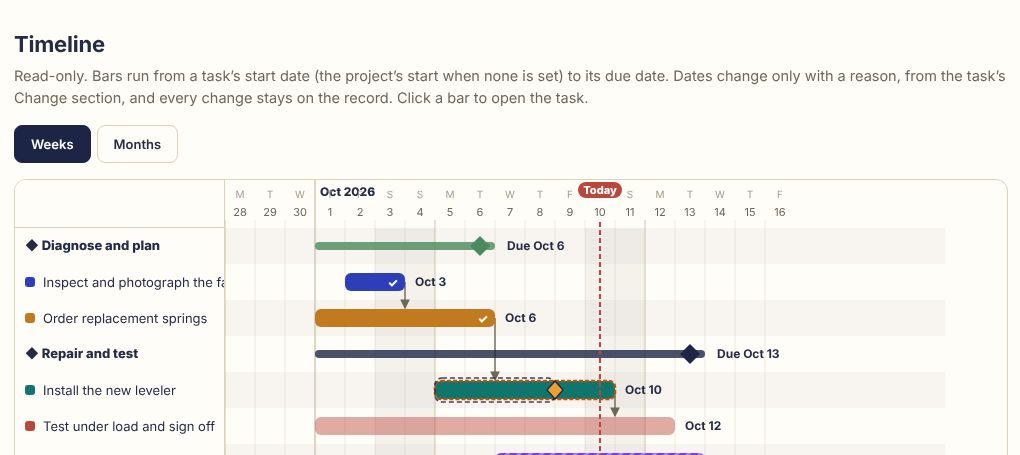
- Tasks that wait on other tasks, shown on a timeline.
- Finish with a Project Record PDF that anyone can check from its QR code.
More about Projects
Turnovers, repairs, installs and inspections become projects with milestones and tasks. Each task says what proof closes it.
- Photos or documents required before a task can close. Nobody verifies their own work.
- Every date change needs a reason, and the original date stays on screen.

Routines
Checks that repeat, without the clipboard.
- Reminders by email when a check is due.
- A missed check is counted on the Lens, never hidden.
More about Routines
A daily forklift check, a weekly fire extinguisher walk, a staff review every two weeks. Each one appears when it is due and becomes a sealed record when it is filled in.
- Start from a template so every check asks the same questions.

The Lens
See what's slipping at a glance.
- Missed routines and overdue tasks are counted, never hidden.
More about the Lens
Your logo becomes a readout. Each slice is an area of work, the dot turns red when work is strained, and the flare shows how much finished on time.
- One click turns it into the Bird's-Eye Summary: findings and a next step for each, ready to print.
- Oversight shows what U.S. federal rules ask beside each form. Information, not legal advice.
Ask Cibotti
Say it once. Check the draft.
- Short commands such as “open the Lens” or “my tasks” open straight away, without the AI.
- It never says who a person is, never reads faces and never gives a cause or blame.
More about Ask Cibotti
Type or say what happened, in your own words. Cibotti drafts the record or the project, and nothing is saved until you press Submit or Create.
- Ask Cibotti about a photo: it lists what it sees, and you untick anything wrong before it goes into the record.
- Built on Claude, by Anthropic. Every plan includes a daily allowance, and bundles add more.
Ask the customer for photos
Photos straight from the customer.
- No account and no app for the customer.
- The link must be opened within 7 days, then works for 2 hours on one phone or computer.
More about customer photos
From a record or a job, Cibotti emails your customer a one-time link. They add up to 10 photos, their name and a note, and press Send. What they send arrives as one sealed record in that job.
- Executives, the person who sent the link, and managers who can see that job see what arrives.
Jobs
Estimate, proof of work, invoice. One job.
- The label is sealed into each record, so it cannot be changed later.
- Each job has its own page with its records in order.
Guide: proving the work was done
More about Jobs
Three record types for the work you sell. Give them the same label, such as the customer and the job, and the job’s records stay together.
- Send any of them to the customer to confirm, with the file attached.
- Photos you ask a customer for from a job arrive in that job.
Business helpers
Business math, shown step by step.
Projections are not guarantees, and the helpers are not financial, tax or legal advice.
Open the live demo, then Lens, Business helpers.
More about the helpers
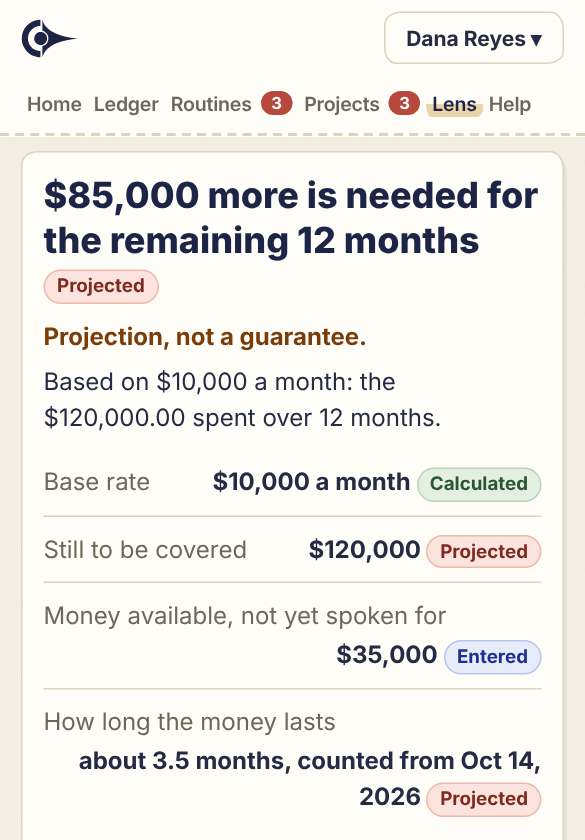
Four calculators for everyday money, job and supply questions. You type the figures, and fixed code in your browser does the arithmetic, not AI.
- Contract funding: how long the money left may last, and how much more is needed.
- Job cost and price: a cost estimate, and the price for the margin or markup you choose.
- Supply coverage and reorder: a range of days a supply may last, and roughly when to reorder.
- Materials: how much paint, flooring, packaging or film to buy, and the cost at the price you type.
- “Show the calculation” lists every step, what was assumed and what is missing. Copy or print it.
Outside confirmation
Let customers and vendors confirm it themselves.
- They confirm it, or dispute it with a note.
- Their answer is sealed next to your record, with the time.
More about outside confirmation
Send a one-time link from almost any entry, a vendor payment or a signed agreement included. The other person sees that one record (and its attached file, if you share it) and confirms or disputes it. No account, no app.
- Delivery received, work completed, move-out condition, an inspection finding.

Built around your company
The right people see the right things.
Reporting lines
Roles by report type
Your own report types
Device-Lock and API
More about who sees what
Reporting lines
Managers see the people who report to them. Executives see everything.
Roles by report type
A safety officer sees every injury. Finance sees cash entries and nothing else.
Your own report types
Add the records your business keeps, and save entries or whole projects as templates.
Device-Lock and API
Optional sign-in only from approved devices. Read-only API and signed webhooks.
Record pack
Don’t trust us. Check.
- The checker says what it checked and what it could not check, in plain words.
- It works offline. Looking up the Bitcoin blocks online is optional.
More about the record pack
Download any record as one ZIP file: the record, its files, its proofs and a checker. Open the checker on any computer to check the pack yourself, without relying on Cibotti.
- Executives get the full pack, with the chain linking the record to its Bitcoin timestamp. Others get the record and its files.
Check it yourself
Anyone can check a record. No login.
More about the public check
The public check shows which company's ledger holds a record, when it was made and whether it is stamped on Bitcoin. It never shows what the record says.
- Logged. Your team records what happened, with photos.
- Sealed. Each entry is fingerprinted and chained to the one before.
- Stamped. Every 10 minutes the latest fingerprint is sent for a Bitcoin timestamp; Bitcoin confirms it some hours later.
- Checked. An auditor or insurer pastes a fingerprint into the public check.
Pricing in full
Four flat monthly prices.
- Up to 10 people$49 a month
- 11 to 30 people$109 a month
- 31 to 75 people$209 a month
- 76 to 150 people$359 a month
Prices do not include sales tax, which is added where it applies.
More about prices, paying, cancelling and bundles
$49 a month for up to 10 people, $109 a month for 11 to 30, $209 a month for 31 to 75, $359 a month for 76 to 150. Prices do not include sales tax, which is added where it applies. Everything on this page is included in every plan.
What is included
- The Ledger, Projects, Routines and the Lens
- Outside confirmation links and Project Record PDFs
- Reporting lines, roles and your own report types
- Email reminders, Speak, and photo credentials checks
- Device-Lock: sign-in only from approved phones and computers
- Business helpers: calculators for funding, job prices, supplies and materials
Monthly, cancel any time
Paid by card each month through Helcim, our payment provider. No free trial on online plans. Larger teams can ask about a pilot: email john@cibotti.app. To cancel, an executive presses Cancel subscription under Admin, Billing (on a signed agreement: email john@cibotti.app); we stop the next charge and refund the unused days of the month to your card.
Device-Lock included
Your executives can require each person to sign in only from their own approved phone or computer, unlocked with a fingerprint, face or screen lock.
Ask Cibotti bundles
On any plan bought online you can add one of two bundles: for $10 a month, 3,000 more requests and 1,000 more photos; for $15 a month, 6,000 more requests and 2,500 more photos. Add one under Admin, Billing.
More than 150 people?
Email john@cibotti.app for a quote.
More questions
Straight answers.
How is this different from a task app or a form app?
Task and form apps keep records the vendor can change and nobody outside can check. Cibotti seals every record, lets anyone check it without a login, and lets the people involved confirm it. It can sit beside the tools you already use.
Who can see our records?
Only your company. Inside it, people see what their role allows: staff their own entries, managers their people's, executives everything. No other customer can see anything of yours, and outside your company only Cibotti support can open your account, to help when needed.
What does it cost?
$49 a month for up to 10 people, $109 a month for 11 to 30, $209 a month for 31 to 75 and $359 a month for 76 to 150, plus sales tax where it applies. Everything is included. More than 150 people: email john@cibotti.app for a quote. Paid monthly by card; cancel any time. Device-Lock is included.
What if someone tries to change a record?
They can't do it quietly. Nobody can edit or delete an entry in the app. A change made any other way breaks the chain of fingerprints, which Verify chain shows, and once Bitcoin confirms the timestamp, the original fingerprint is fixed outside our control; until then only our own copies hold it.
Can we use our own forms?
Yes. Save any entry or project as a template with blanks to fill in, add your own report types, or attach a completed form as a photo or PDF.
What do the Business helpers work from?
The figures you type. They never read your records, and Cibotti keeps no running stock level, so you type the count and the usage. You also type coverage and package sizes from the label; Cibotti never assumes them. Some boxes start with a value you can change, such as 10% either side for the funding scenarios. The amount above cost is not profit, and overhead counts only if you add it.
Business helpers: where do my figures go, and who can use them?
Your figures stay in this browser tab until you sign out (also automatically after 30 minutes without activity) or press “Clear these figures”, so on a shared computer, sign out when you are done. Nothing is sent or recorded unless you do it yourself. Everyone in your company can use the helpers, except people added to projects only as client viewers.
Do we need to install anything?
No. It runs in the browser on any phone or computer. Each person gets their own access code, and you can add someone in a minute.
How do I pay, and can I cancel?
By card, every month. Sign up online at cibotti.app/start, or ask us for a signed agreement. Helcim, our payment provider, takes the payment: you type your card into Helcim's secure payment form; it is not sent to Cibotti, and we never see the full card number or the security code. To cancel, an executive opens Menu, Admin, Billing, Cancel subscription (companies on a signed agreement email john@cibotti.app): we stop the next charge and refund the unused days of the month to your card. Your records are kept, and you can still read and download them.
Can I cancel?
Yes, any time: under Admin, Billing, Cancel subscription (on a signed agreement: email john@cibotti.app). We stop the next charge and refund the unused days of the month to your card. Your records are kept, and you can still read and download them.
I got a link asking me to confirm a record. What is this?
A company that keeps its records in Cibotti is asking you to confirm or dispute one of them, such as a delivery or finished work. Open the link and press Open the record: it shows only that record, with a note box and two buttons, and the record's file if they shared it. You don't need an account or the app. You can answer once; after you open it, the link works for an hour in that browser only, and your answer is sealed into their record with the time. If it has expired, ask the company for a new one.
What do the photos and screens on the site show?
Photos are illustrative. App screens are real, shown with sample data.
Recordkeeping rules explained in plain words: see the guides.